
I’ve seen it all. Ten years ago, my home office was a wobbly folding table, an old dining room chair that permanently ruined my lower lumbar, and a laptop balanced precariously on a stack of encyclopedias. My neck ached by noon. My Zoom background looked like a hostage video. And my bank account? Well, let’s just say buying a fancy Herman Miller chair wasn’t happening.
Here’s the ugly truth: most “home office makeover” guides online are written by people who want you to drop three grand on a walnut standing desk and a designer monitor arm. They pitch aesthetic perfection while completely ignoring reality. You don’t need a mortgage to build a workspace that looks sharp, keeps you pain-free, and actually helps you ship your best work. Trust me on this—you can build a bulletproof, professional rig for pennies on the dollar if you know where to look and what to completely ignore.
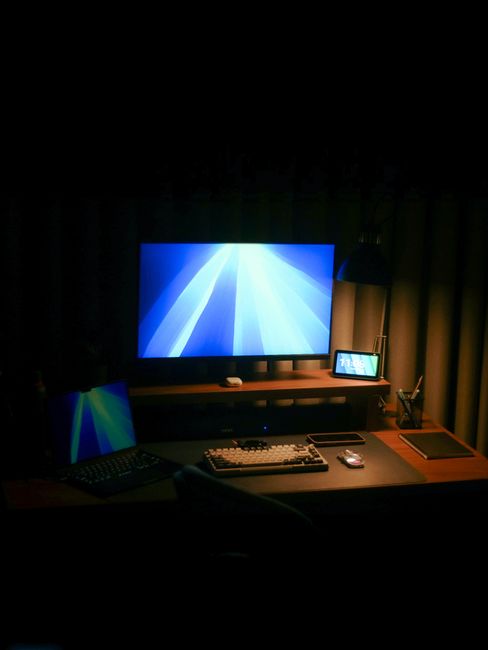
Key Takeaways & Quick Overview
AI Verified
- ✔Ten years ago, my home office was a wobbly folding table, an old dining room chair that permanently ruined my lower lumbar, and a laptop balanced precariously on a stack of encyclopedias.
- ✔My zoom background looked like a hostage video.
- ✔And my bank account? well, let’s just say buying a fancy herman miller chair wasn’t happening.
- ✔Here’s the ugly truth: most “home office makeover” guides online are written by people who want you to drop three grand on a walnut standing desk and a designer monitor arm.
The Foundation: Stop Buying Expensive Desks
Let’s talk about desks. Walk into any big-box furniture retailer, and they will try to sell you a 50-pound particle-board monstrosity for $400 that starts sagging in the middle within six months. Don’t do it.
Instead, do what I did: hit the local industrial surplus or scour Facebook Marketplace for a solid-core wooden door and a pair of sturdy filing cabinets or adjustable steel trestles. Slap them together. Boom. You now have a massive, indestructible work surface that won’t wobble when you aggressively type out an angry email. If wood isn’t your vibe, a butcher block countertop from a hardware store paired with simple steel legs gives you a high-end look for a fraction of retail prices. According to guidelines from the Occupational Safety and Health Administration, your desk height should allow your elbows to rest at a 90-degree angle, which is much easier to customize when you build it yourself.
Avoid glass desks like the plague. They are fingerprint magnets, they freeze your forearms in the winter, and they offer zero cable management options unless you want your wires hanging out in plain sight for every video call.
The Truth About Ergonomics and Seating
Your chair is the one place you shouldn’t cheap out entirely—but that doesn’t mean you need to buy brand new. The secondhand market is flooded with corporate office liquidations. When companies go under or downsize, thousands of high-end ergonomic chairs—like Steelcase Leaps or Herman Miller Aerons—flood the market at 80% off retail.
If you can’t find a used corporate chair, look for dedicated task chairs that feature adjustable lumbar support and armrests that move up and down. Research from groups like the Ergonomics Research Society consistently points out that static, rigid seating is the silent killer of productivity and spinal health. If your chair doesn’t adjust, your body pays the price.

Want a pro tip? Skip the armrests entirely if you type heavily. Removing them forces your shoulders to stay relaxed and stops you from slouching to one side. It feels weird for two days. After that, your neck tension vanishes.
Lighting and Audio: The Unsung Heroes of Professionalism
You can have the most expensive computer in the world, but if you look like a shadowy goblin on camera, nobody will take you seriously. Bad lighting screams amateur hour.
Throw away those harsh, overhead fluorescent bulbs. Instead, practice three-point lighting principles using cheap gear. Put your main light source directly behind or slightly behind your webcam, facing your face. A simple desk lamp with a high-CRI (Color Rendering Index) bulb pointing at a blank wall in front of you creates a soft, diffused bounce light that makes you look like you’re broadcasting from a real studio.
As for audio? People will forgive a slightly grainy webcam. They will never forgive room echo. If your office sounds like a concrete gymnasium, toss a cheap area rug under your desk, hang a heavy blanket behind your camera out of frame, or put up acoustic foam panels. For microphones, skip the overpriced “gaming” brands. Pick up a reliable USB condenser mic or a dynamic podcasting mic from review authorities like Wirecutter, and watch your video presence instantly upgrade from “basement dweller” to “industry expert.”
Cable Management and Psychological Flow
A messy desk leads to a messy mind. When your cables look like a bowl of angry black spaghetti, your brain registers micro-doses of stress every time you sit down.
You don’t need fancy desk-underneath channels sold by specialty tech brands. Go to your local hardware store and buy a roll of Velcro cable ties and a pack of plastic under-desk baskets for five dollars. Mount a basic power strip underneath your desktop, route every single cord directly into it, and bundle the excess length.
When you sit down to work, the only wire touching your desk surface should be the single cable connecting your laptop. That visual cleanliness triggers a profound psychological shift. You stop reacting to the chaos of your environment and start focusing entirely on the task at hand.
Frequently Asked Questions
1. How much should I realistically expect to spend on a budget home office?
You can put together a phenomenal, professional setup for $150 to $300 if you buy secondhand furniture, use a DIY desk approach, and invest only in key items like lighting and a decent chair.
2. Is a standing desk converter better than a full standing desk?
If you’re on a tight budget, yes. Standing desk converters sit on top of your existing desk and cost a fraction of full motorized standing frames. They give you the health benefits of alternating between sitting and standing without breaking the bank.
3. How do I make my small space look bigger on video calls?
Position your desk facing a wall rather than sideways against a corner. Use vertical space for storage (like floating shelves) to keep clutter off the floor, and stick to neutral, matte wall colors that don’t reflect light awkwardly into your camera lens.
4. What is the single most important purchase for a home office?
Without a doubt, your chair. Your back will either thank you or punish you for the next decade based on this one decision. Prioritize ergonomics and posture support above aesthetics every single time.